Customer expectations have changed rapidly. Speed, accuracy, and availability now define customer experience. Businesses can no longer rely on manual support systems that slow down response times and increase operational costs.
Automated customer service addresses this shift by using AI-driven systems to handle customer interactions at scale. Automated customer service allows businesses to deliver faster support, reduce workload, and maintain consistent service quality across channels.
Table of Contents
What Is Automated Customer Service
Definition of Automated Customer Service
Automated customer service refers to the use of technology to manage customer interactions without constant human involvement. These systems handle repetitive tasks such as answering queries, routing tickets, and providing updates in real time.
Instead of relying entirely on human agents, businesses deploy systems that can process requests instantly. As a result, customers receive immediate responses regardless of query volume or time of day.
Core Components of Automated Customer Service
Automated customer service is not a single tool. It is a connected system made up of multiple layers working together.
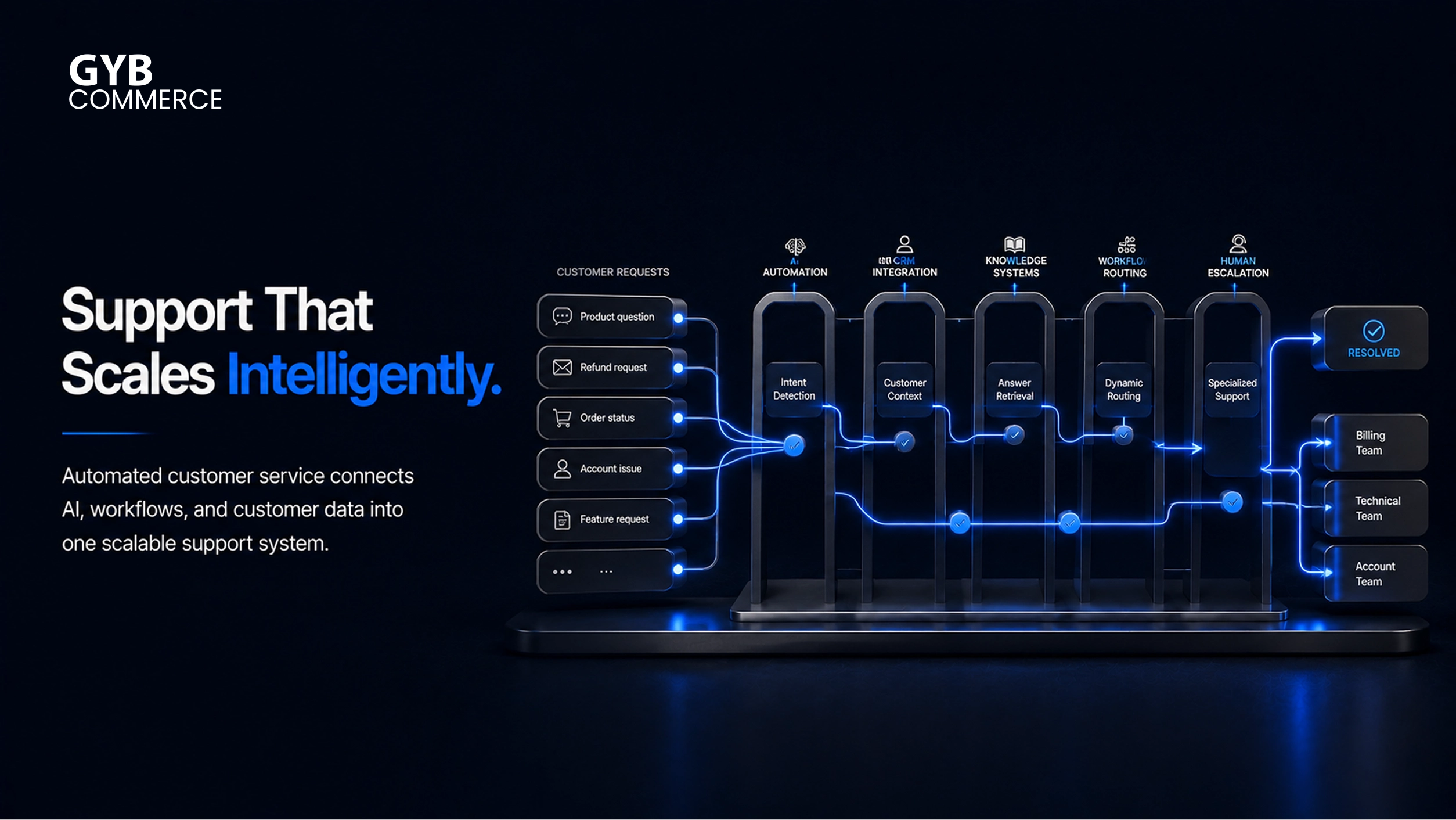
At the front, chatbots and virtual assistants handle incoming queries. Behind them, AI-powered systems interpret intent and generate responses. CRM platforms and ticketing systems manage customer data, track interactions, and route issues efficiently.
Self-service portals extend this system further by allowing customers to resolve common issues without contacting support. When all components are integrated properly, the system operates as a unified support engine rather than separate tools.
Role of AI in Customer Service Automation
Artificial intelligence is what makes automation truly effective. Without AI, systems rely on rigid rules. With AI, systems understand context, adapt responses, and improve over time.
Natural language processing allows systems to interpret real customer queries instead of relying on exact keywords. This reduces friction and improves response accuracy.
Over time, these systems learn from interactions. Each query helps refine future responses, making the system more efficient and reliable at scale.
How Automated Customer Service Works
End-to-End Workflow of Customer Service Automation
Every automated customer service interaction follows a structured flow, even though it feels instant to the user.
A customer submits a query through chat, email, or another channel. The system captures this input and processes it using natural language processing. It identifies intent and determines the appropriate response.
If the request is simple, the system responds instantly. If the issue is complex, it is routed to a human agent with full context attached. This ensures efficiency without sacrificing quality.
Workflow Automation and Ticket Routing
Once a query enters the system, workflow automation takes control. Instead of manual sorting, predefined logic categorizes and routes requests.
Simple issues are resolved automatically, while more complex queries are escalated based on priority and context. This removes bottlenecks and ensures that support operations remain efficient even at scale. You can also explore what role automation plays in customer service overall.
Integration with CRM and Data Systems
Automation becomes significantly more effective when integrated with platforms like Salesforce. These systems provide access to customer history, past interactions, and transactional data.
This allows automated systems to deliver responses that are both fast and context-aware. Instead of generic replies, customers receive answers tailored to their specific situation.
Omnichannel Support and Continuity
Modern automated systems operate across multiple channels simultaneously. Customers can start a conversation on one platform and continue on another without losing context.
This continuity ensures a consistent experience. It also reduces frustration, as customers are not required to repeat information across different touchpoints.
Key Components That Power Automated Customer Service
To understand how automated customer service functions as a complete system, it helps to look at the core components working together:
- Chatbots and virtual assistants handling first-level interactions
- AI-powered customer service systems interpreting intent and generating responses
- CRM platforms managing customer data and interaction history
- Ticketing systems organizing, prioritizing, and routing requests
- Self-service portals enabling customers to resolve issues independently
These components are not isolated. When integrated properly, they form a scalable infrastructure that supports high-volume customer interactions without compromising speed or accuracy.
How to Automate Customer Service
Step 1: Identify Repetitive Customer Service Tasks
Before implementing any automation, businesses need clarity on what should be automated. Not every interaction requires automation, and forcing it across all touchpoints creates friction.
Start by analyzing support data. Look for patterns in customer queries, ticket volume, and response types. Most businesses discover that a large percentage of requests fall into predictable categories such as order tracking, password resets, appointment scheduling, and basic FAQs.
Automation works best when applied to high-volume, low-complexity tasks. These are the areas where response speed matters more than human judgment. By isolating these workflows first, businesses create a stable foundation for automation without disrupting critical support functions.
Step 2: Select the Right Customer Service Automation Tools
Once tasks are identified, the next step is choosing the right tools. This decision directly impacts how scalable and flexible the system will be.
Modern customer service automation relies on a combination of chatbot platforms, CRM systems, help desk software, and workflow automation engines. The key is not choosing individual tools in isolation, but selecting systems that integrate seamlessly.
Platforms like Salesforce play a central role here, acting as the data layer that connects all interactions. Without proper integration, automation becomes fragmented and inconsistent.
The goal is to build a system where tools communicate with each other in real time. This ensures that data flows across channels, enabling consistent and context-aware support.
Step 3: Deploy AI Chatbots and Virtual Assistants
Chatbots are usually the first visible layer of automation. They act as the entry point for most customer interactions.
However, modern chatbots are not limited to scripted responses. With conversational AI, they can understand intent, ask follow-up questions, and guide users through workflows. This allows them to handle a wide range of queries without human involvement.
Deployment should focus on clarity and usability. The chatbot must be able to resolve common issues quickly while also recognizing when to escalate conversations. Poorly designed bots that trap users in loops can damage customer experience instead of improving it.
A well-implemented chatbot reduces ticket volume, improves response time, and ensures availability across all hours.
Step 4: Build a Centralized Knowledge Base
Automation depends heavily on access to accurate information. Without a structured knowledge base, even the most advanced systems fail to deliver reliable responses.
A knowledge base acts as the source of truth for both automated systems and human agents. It includes FAQs, troubleshooting guides, policies, and process documentation.
More importantly, it supports self-service. Customers can find answers without initiating a support request, which reduces dependency on both bots and agents.
As the system evolves, the knowledge base must be continuously updated. Every new query or edge case should feed back into it, improving the system’s ability to respond in the future.
Step 5: Integrate Workflows and Optimize Continuously
The final step is connecting everything into a unified workflow. Automation is not just about individual tools. It is about how those tools interact.
Workflow automation defines how requests move through the system. It controls routing, escalation, prioritization, and follow-ups. When implemented correctly, it ensures that every interaction follows a predictable and efficient path.
After deployment, continuous optimization becomes critical. Businesses need to monitor performance, identify gaps, and refine workflows based on real data. Automation is not a one-time setup. It is an evolving system that improves with usage.
Key Use Cases of Customer Service Automation
Handling High-Volume Customer Queries
One of the most common use cases is managing repetitive, high-frequency queries. These include order status updates, account-related questions, and general inquiries.
Automation allows businesses to respond instantly without increasing support staff. This reduces wait times and improves overall customer satisfaction.
Automating Ticket Routing and Escalation
Manual ticket routing slows down operations and introduces errors. Automation eliminates this by categorizing and assigning tickets based on predefined logic.
Requests are routed to the right team instantly, while urgent issues are prioritized automatically. This ensures faster resolution without manual intervention.
Enabling Self-Service Customer Support
Self-service is a critical component of modern customer experience. Customers prefer solving problems independently when possible.
By combining knowledge bases with automation, businesses allow users to find answers quickly. This reduces support load while improving user satisfaction.
Benefits of Automated Customer Service
Improved Response Speed and Availability
Automation enables instant responses across all channels. Customers no longer need to wait for agents to become available.
This 24/7 availability significantly improves customer experience, especially for global businesses operating across time zones.
Reduced Operational Costs
Handling large volumes of support requests manually requires significant resources. Automation reduces this dependency by handling routine queries efficiently.
As a result, businesses can scale support operations without proportional increases in cost. Understanding the advantages of automated customer service helps justify this setup.
Consistent and Scalable Customer Experience
Human support can vary in quality depending on workload and experience. Automated systems deliver consistent responses every time.
This consistency becomes more valuable as businesses grow and support demand increases.
Tools and Platforms for Customer Service Automation
Categories of Customer Service Automation Tools
Customer service automation is not built on a single platform. It is an ecosystem of tools that work together to manage interactions, data, and workflows.
Find professional customer service automation solutions to build this system quickly.
At a high level, these tools fall into a few functional categories. AI chatbot platforms handle real-time conversations. CRM systems manage customer data and interaction history. Help desk software organizes tickets and tracks resolutions. Workflow automation tools control routing, escalation, and internal processes.
The effectiveness of automation depends on how well these layers are connected. Disconnected tools create delays and inconsistencies, while integrated systems operate as a single engine.
Role of CRM and Service Platforms
CRM platforms act as the backbone of automated customer service systems. They centralize customer data and ensure that every interaction is informed by context.
Platforms like Salesforce enable businesses to unify support operations across channels. They store customer history, track ongoing issues, and allow automation systems to access real-time data.
This integration allows automated systems to deliver responses that are not only fast but also relevant. It also ensures that human agents step in with full visibility when required.
Choosing the Right Automation Stack
Selecting the right tools is less about features and more about compatibility. Businesses should prioritize systems that integrate easily and support long-term scalability.
The focus should remain on building a connected architecture rather than assembling isolated tools. This ensures that as support volume grows, the system continues to perform without requiring major restructuring.
How to Measure Success in Customer Service Automation
Key Performance Metrics to Track
Automation must be measured to ensure it delivers real value. Without clear metrics, it becomes difficult to identify what is working and what needs improvement.
Some of the most critical metrics include response time, resolution time, and customer satisfaction. These indicators show whether automation is improving efficiency and experience.
Tracking ticket volume before and after automation also provides insight into workload reduction. A decrease in manual handling indicates that the system is effectively absorbing routine queries.
Continuous Monitoring and Optimization
Measurement is not a one-time activity. Automated systems require continuous monitoring to maintain performance.
Businesses should regularly review interactions, identify failure points, and refine workflows. This includes updating knowledge bases, improving chatbot responses, and adjusting routing logic.
Over time, these incremental improvements compound, leading to a more accurate and efficient system.
Common Challenges in Customer Service Automation
Over-Automation and Poor User Experience
One of the most common mistakes is automating too aggressively. Not every interaction should be handled by a system.
When customers are forced through rigid workflows without the option to reach a human, frustration increases. Automation should enhance the experience, not restrict it.
Lack of Integration Between Systems
Automation fails when systems do not communicate effectively. Disconnected tools create gaps in data, leading to inconsistent responses and delays.
A unified architecture is essential. Without it, even advanced tools cannot deliver reliable performance.
Inadequate Training and Data Quality
Automated systems rely on data to function effectively. Poor-quality data leads to inaccurate responses and reduced trust.
Businesses must invest in training their systems properly. This includes feeding accurate data, refining responses, and continuously improving the knowledge base.
Future of Automated Customer Service
Rise of Generative AI in Customer Support
The next phase of automation is being driven by generative AI. These systems move beyond predefined responses and generate dynamic, context-aware answers.
This allows businesses to handle more complex queries without human intervention. It also improves personalization, making interactions feel more natural.
Predictive and Proactive Customer Service
Automation is shifting from reactive support to proactive engagement. Systems can now anticipate issues and notify customers before they escalate.
This reduces support volume while improving customer trust. It also positions businesses as proactive rather than reactive.
Increasing Role of Conversational Interfaces
Customer interactions are becoming more conversational. Voice assistants, chat interfaces, and AI-driven conversations are replacing traditional support channels.
As these interfaces improve, automation will become more seamless and intuitive for users.
Frequently Asked Questions
What is automated customer service?
Automated customer service uses technology to handle customer interactions without constant human involvement. It focuses on managing repetitive tasks such as answering queries, routing tickets, and providing real-time support.
How to automate customer service?
To automate customer service, businesses identify repetitive tasks, implement AI tools like chatbots, integrate CRM systems, and build workflows that handle queries efficiently. Continuous optimization ensures long-term performance.
How does automated customer service work?
Automated customer service works by capturing customer queries, analyzing intent using AI, and responding instantly or routing requests to agents. The system relies on workflows, data integration, and intelligent processing.
What are the benefits of customer service automation?
Customer service automation improves response time, reduces operational costs, and ensures consistent support quality. It also allows businesses to scale support operations without increasing team size.
What tools are used for customer service automation?
Customer service automation uses chatbot platforms, CRM systems, help desk software, and workflow automation tools. These systems work together to manage interactions and streamline support processes.
What are examples of automated customer service?
Examples include chatbots handling FAQs, automated ticket routing, self-service knowledge bases, and proactive notifications about order updates or system issues.
What challenges come with automated customer service?
Common challenges include over-automation, lack of system integration, and poor data quality. Addressing these issues requires proper planning, continuous monitoring, and system optimization.
Final Takeaways
Automated customer service is not just about reducing workload. It is about building a system that handles growth without compromising experience. When implemented correctly, it transforms support from a cost center into a scalable operational advantage.
If you are looking to implement customer service automation that integrates seamlessly with your workflows, GYB Commerce focuses on building systems that deliver speed, accuracy, and long-term scalability.