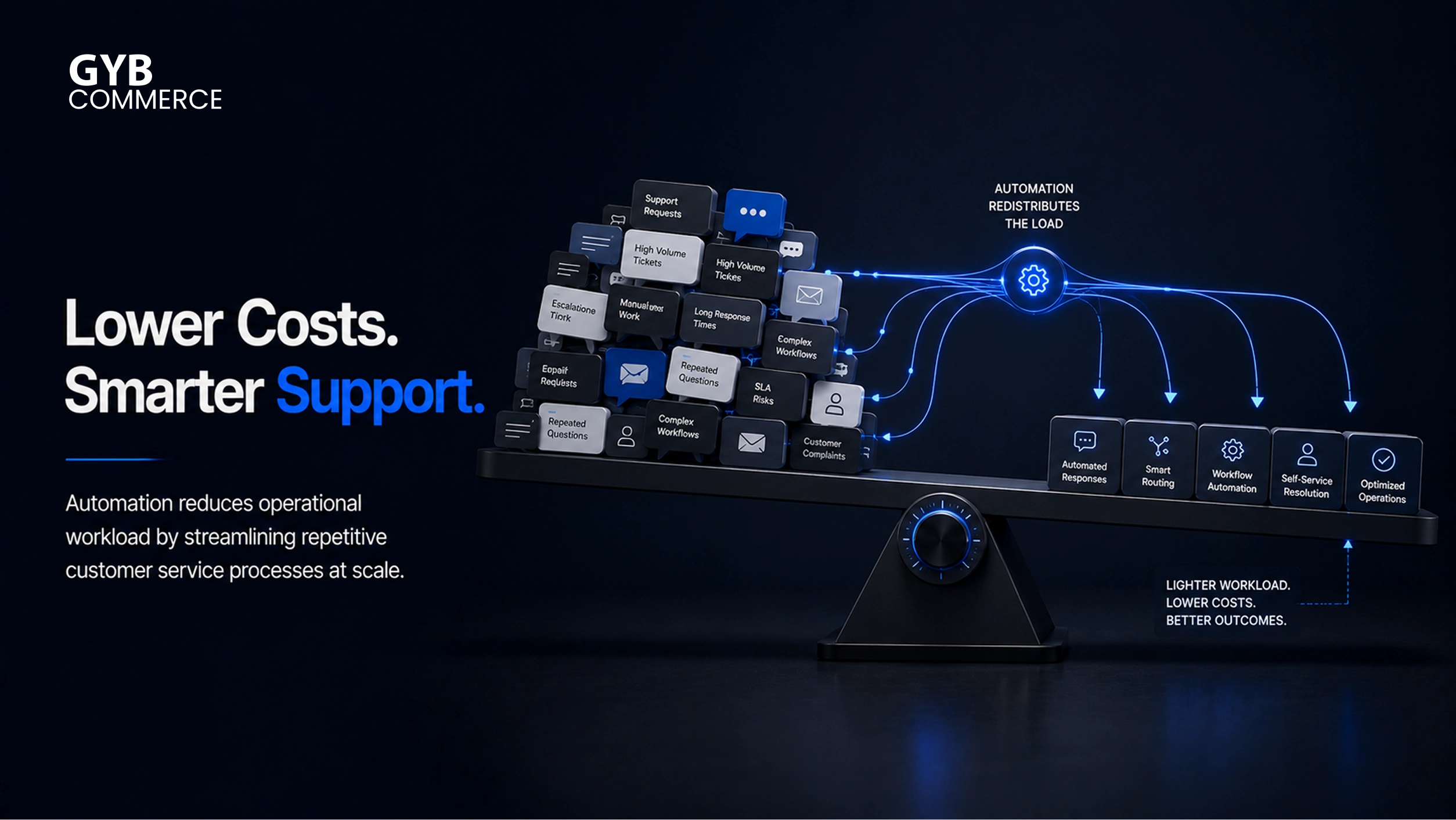
Customer support costs continue to rise as ticket volumes increase and customer expectations evolve. Businesses now face constant pressure to deliver faster responses without expanding teams. Automation has become a practical solution that helps reduce operational costs while maintaining consistent service quality. When implemented correctly, it improves efficiency, reduces manual effort, and allows support teams to focus on complex interactions.
Cost Challenge: Why Customer Support Costs Are Increasing
Customer support is scaling faster than most teams can handle. As businesses grow, the volume of customer interactions increases across multiple channels.
Customers now expect instant responses, 24/7 availability, and consistent support quality. Meeting these expectations with traditional support models requires hiring more agents, which increases costs significantly.
At the same time, support queries are becoming more complex. This increases handling time and reduces team efficiency. As a result, businesses experience rising costs without a proportional improvement in customer satisfaction.
Automation changes this dynamic by handling repetitive queries and reducing dependency on large support teams.
What Drives Customer Service Costs in Modern Support Systems
Understanding cost drivers is critical before implementing any automation strategy. Customer support costs are not limited to salaries. They include multiple layers of operational and hidden expenses.
Review what automated customer service is to start fixing these issues.
Personnel Costs
Personnel costs make up the largest portion of customer support expenses. These include salaries, benefits, onboarding, and ongoing training.
As ticket volumes grow, businesses need more agents to maintain response times. This creates a direct increase in operational costs. Additionally, high turnover in support roles adds recruitment and training expenses.
Automation helps reduce this burden by allowing AI agents to handle repetitive queries. This reduces the need to scale teams linearly.
Operational Costs
Operational costs include tools and systems required to manage support operations. These include helpdesk platforms, customer support software, reporting tools, and communication systems.
As businesses grow, these tools become more complex and expensive. Integrations, maintenance, and upgrades also add to the cost.
Automation reduces operational overhead by streamlining workflows and reducing tool dependency. AI-powered systems can handle multiple tasks within a single environment.
Overhead and Infrastructure
Support teams require infrastructure such as office space, hardware, and software licenses. Even remote teams rely on digital infrastructure, which still adds ongoing costs.
Scaling support operations increases these expenses. More agents require more resources, which raises the total cost of ownership.
Automation reduces infrastructure pressure by minimizing the need for large teams. Fewer agents mean lower overhead costs.
Hidden Costs in Support Operations
Hidden costs often go unnoticed but significantly impact total expenses. These include inefficiencies in workflows, repeated handling of the same queries, and inconsistent responses.
Other hidden costs include:
- Agent burnout and turnover
- Poor knowledge base systems
- Manual ticket routing
- Delayed resolution times
These issues increase operational friction and reduce efficiency. Automation addresses these gaps by standardizing processes and improving response accuracy.
How to Calculate Cost per Ticket in Customer Support
Measuring cost per ticket helps businesses understand how efficiently their support operations are running. It also provides a clear benchmark for evaluating automation impact.
Cost Formula
Cost per ticket is calculated by dividing total support costs by the number of tickets handled within a specific period.
This includes all expenses such as salaries, tools, infrastructure, and overhead. A high cost per ticket indicates inefficiency in support operations.
Automation reduces cost per ticket by lowering manual workload and increasing the number of queries resolved automatically.
Why Manual Support Increases Costs
Manual support processes require agents to handle every query individually. This includes gathering information, verifying details, and responding to customers.
Repetitive queries consume a significant portion of agent time. This reduces overall productivity and increases resolution time.
Manual workflows also create bottlenecks during peak periods. This leads to delays, customer dissatisfaction, and increased operational costs.
Automation eliminates these inefficiencies by handling routine queries instantly. It also supports faster resolution through intelligent workflows.
Key Pain Points That Increase Customer Support Costs
Several operational challenges directly contribute to rising customer support costs. These issues limit scalability and reduce efficiency.
High volumes of repetitive queries create unnecessary workload for support teams. Many of these queries can be resolved without human intervention.
Limited self-service options force customers to contact support for basic issues. This increases ticket volume and handling time.
Inefficient ticket routing leads to delays and multiple handoffs. This increases resolution time and reduces customer satisfaction.
Inconsistent responses create confusion and require follow-ups. This adds to the total number of interactions needed to resolve a single issue.
Lack of automation in workflows slows down processes. This prevents teams from operating efficiently at scale.
How Poor Customer Support Quality Impacts Revenue
Customer support quality directly affects business performance. Poor support experiences lead to frustration, which increases customer churn.
Slow response times and inconsistent answers reduce trust. Customers are less likely to continue using a product or service when support is unreliable.
Poor support also impacts customer lifetime value. When issues are not resolved efficiently, customers disengage and move to competitors.
Automation improves service quality by providing instant and consistent responses. It ensures that customers receive accurate information without delays.
This balance between cost reduction and quality improvement is what makes automation essential for modern customer support systems.
How to Reduce Customer Service Costs with Automation
Automation provides a structured way to reduce support costs without reducing service quality. Instead of replacing teams, it removes repetitive workload and improves operational efficiency.
Automated Query Resolution
A large percentage of customer queries are repetitive. These include order status, account access, policy questions, and basic troubleshooting.
AI customer support systems handle these queries instantly. They use trained data, knowledge base systems, and past interactions to generate accurate responses.
This reduces ticket volume and allows human agents to focus on complex issues. As a result, businesses can reduce support costs while improving response speed.
Intelligent Ticket Routing
Manual ticket routing slows down support operations. It often leads to misclassification, delays, and multiple handoffs.
Automation solves this through intent classification and AI-driven workflows. Tickets are analyzed and routed to the correct department instantly.
This reduces resolution time and improves efficiency. It also ensures that each query reaches the right agent without unnecessary delays.
Understand what role automation plays in customer service to lower expenses.
24/7 AI Customer Support
Customers expect support at all times. Meeting this demand with human teams requires additional staffing and higher costs.
AI agents provide round-the-clock support without increasing operational expenses. They handle queries during off-hours and reduce backlog.
This improves response time and ensures continuous availability without scaling teams.
Self-Service and Knowledge Base Systems
Self-service support plays a major role in reducing customer support costs. When customers can resolve issues independently, ticket volume decreases.
AI enhances self-service by improving how users interact with knowledge base systems. Instead of searching manually, customers receive direct answers.
This improves user experience while reducing dependency on support agents.
AI Integration with Existing Support Systems
Automation works best when integrated with existing platforms. AI systems connect with helpdesk tools, CRMs, and internal workflows.
This allows automation to perform actions such as retrieving account details, updating records, or processing requests.
Integration reduces manual work and improves accuracy. It also ensures that automation becomes part of the existing support ecosystem rather than a separate layer.
Multilingual AI Support
Supporting multiple languages requires additional resources when handled manually. This increases staffing and operational costs.
AI systems can handle multilingual queries without requiring separate teams. They translate and respond in real time.
This expands support coverage while keeping costs under control.
How AI Improves Customer Support Efficiency and Reduces Costs
AI improves efficiency by automating repetitive tasks and optimizing workflows. It reduces the time required to handle each query.
It also improves accuracy by using structured data and predefined responses. This reduces errors and eliminates inconsistencies.
As automation increases, support teams handle fewer repetitive tasks. This allows them to focus on high-value interactions.
Over time, businesses can scale support operations without increasing costs. This creates a more sustainable and efficient support model.
Measuring ROI from Customer Service Automation
Measuring performance is essential to understand the impact of automation. Businesses rely on specific metrics to evaluate cost reduction and efficiency gains.
Cost per Ticket
Cost per ticket is the most direct indicator of support efficiency. Automation reduces this metric by lowering operational costs and increasing resolution capacity.
Resolution Time
Automation reduces response and resolution times by handling queries instantly. Faster resolutions improve customer satisfaction and reduce backlog.
Ticket Deflection Rate
Ticket deflection measures how many queries are resolved without human involvement. A higher deflection rate indicates effective automation.
Average Handle Time
Automation reduces the time spent on each interaction. It handles initial queries, gathers information, and prepares context for agents.
This reduces overall handling time and improves productivity.
Resolution Rate
Resolution rate measures the percentage of queries fully resolved. AI systems improve this by providing accurate and consistent responses.
A higher resolution rate indicates better support performance and lower operational costs.
Implementation Strategy for Customer Support Automation
Successful implementation requires a structured approach. Businesses need to align automation with existing workflows and support processes. Deploy enterprise customer service automation solutions to achieve these savings.
Assess Current Support Operations
Start by analyzing current support operations. Identify ticket volume, common queries, and handling time.
This helps in understanding where costs are highest and where automation can deliver immediate impact.
Identify Automation Opportunities
Focus on high-volume and repetitive queries. These provide the fastest return on investment.
Automation should be applied where it can reduce workload without affecting service quality.
Deploy AI Customer Support Systems
Choose AI systems that align with business requirements. Deployment should include integration with existing tools and workflows.
This ensures seamless operation and avoids disruption.
Train Teams for AI Collaboration
Support teams need to adapt to new workflows. Instead of handling every query, they manage escalations and complex issues.
Training helps teams work effectively with automation systems.
Monitor and Optimize Performance
Automation is not a one-time setup. Continuous monitoring is required to improve performance.
Businesses should track metrics, analyze results, and refine workflows over time.
Best Practices for Customer Support Automation
Start with simple and repetitive queries. These are easier to automate and deliver quick results.
Maintain accurate and updated knowledge base systems. AI depends on reliable data to provide correct responses.
Ensure clear escalation paths. Customers should be able to reach human agents when needed.
Continuously monitor performance and improve workflows. Automation systems perform better with ongoing optimization.
Common Mistakes to Avoid in AI Customer Support Automation
Poor Knowledge Base Quality
Automation depends on the quality of available information. Outdated or inconsistent content reduces accuracy.
Improving knowledge base systems is essential before implementing automation.
Lack of System Integration
Without integration, automation cannot perform actions. It becomes limited to answering queries instead of resolving them.
Connecting AI systems with backend tools increases effectiveness.
Over-Focus on Ticket Deflection
Focusing only on reducing tickets can lead to poor customer experience. Not all queries should be automated.
Balance automation with human support to maintain quality.
Weak Change Management
Teams may resist automation if they do not understand its role. Poor adoption reduces effectiveness.
Proper communication and training are necessary for successful implementation.
Frequently Asked Questions
How to reduce customer service costs with automation effectively?
To reduce customer service costs with automation, businesses need to focus on repetitive queries and workflow inefficiencies. Automating these areas reduces manual workload and improves efficiency.
A structured approach that includes AI tools, integration, and continuous optimization delivers long-term cost savings.
How does AI in customer support help reduce operational costs?
AI in customer support reduces operational costs by handling high-volume queries automatically. It eliminates the need for large support teams for repetitive tasks.
It also improves efficiency by reducing resolution time and minimizing errors.
What are the best customer support automation tools available?
Customer support automation tools include AI chatbots, helpdesk automation systems, and workflow automation platforms. These tools handle queries, route tickets, and improve response times.
The best tools are those that integrate well with existing systems and support scalable operations.
Can automation replace human customer support agents?
Automation does not replace human agents completely. It handles repetitive and routine queries while humans focus on complex and sensitive issues.
This balance improves efficiency without reducing service quality.
How does ticket deflection reduce customer support costs?
Ticket deflection reduces the number of queries handled by human agents. It allows customers to resolve issues through self-service or AI systems.
This lowers workload and reduces operational costs.
What is the ROI of customer service automation?
The ROI of customer service automation is measured through reduced cost per ticket, faster resolution time, and improved efficiency.
Over time, automation leads to significant cost savings while maintaining or improving service quality.
How to implement customer support automation without affecting service quality?
Businesses should start with simple queries and maintain human oversight. Automation should support teams, not replace them entirely.
Continuous monitoring and optimization ensure that service quality remains consistent.
Final Takeaways
Customer support costs are increasing due to higher demand and rising expectations. Traditional support models struggle to scale efficiently.
Automation provides a practical solution by reducing manual workload, improving efficiency, and maintaining service quality.
When implemented strategically, it lowers cost per ticket, improves response times, and creates a scalable support system.